
DFI LP DK 790FXB-M2RSH - AMD LanParty Motherboard Review
- DFI LP DK 790FXB-M2RSH - AMD LanParty Motherboard Review
- Page 2 - Packaging, Contents and closer look at the motherboard
- Page 3 - Connectors, BIOS and Overclock potential
- Page 4 - Test configurations and testing methods
- Page 5 - Performance: Cinebench 10
- Page 6 - Performance: WPrime, SuperPI
- Page 7 - Performance: memory (Everest Ultimate 4.60)
- Page 8 - Performance: Memory (SiSoft Sandra Lite XII.SP2c)
- Page 9 - Performance: x264 compression and image operations
- Page 10 - Performance: WinRAR and 7-Zip
- Page 11 - Performance: Gaming (3DMark Vantage, Crysis, Crysis Warhead, Unreal Tournament 3)
- Page 12 - Performance: Gaming (Far Cry 2, Enemy Territory: Quake Wars, World in Conflict)
- Page 13 - Conclusion
Page 3 - Connectors, BIOS and Overclock potential
Page 3 - Connectors, BIOS and Overclock potential
Back plate
Considering that this is one of the mos expensive AMD 790FX chipset motherboards, we expected that the interfaces would be plentiful. That proved to be both true and false.

From the standard interfaces in the form of inputs and outputs there are 6 USB 2.0 connectors, PS2 connectors, coaxial and optical S/PDIF connector for compressed digital sound, 3.5mm jacks for 8 channel HD sound and one Gigabit Ethernet network connector. There is also a jumper for BIOS clear, something greatly appreciated by overclock maniacs, yet the motherboards is missing two big ones - 1394 (FireWire) and eSATA connectors to be precise. Worse yet, a quick examination of the motherboard will only disappoint you further - there are no 1394 and eSATA connectors at all in any form. That's a pity since Apple devices that are so popular (especially in the USA) are using FireWire quite often (it is standard actually) and even cheap computer cases allow attaching of 1394 port on the front panel. As for the eSATA - nowadays most external hard drive cases depend on it and even high-performance flash drives are becoming found of it, abandoning USB 2.0.
Mounting and overclock

For our overclock tests we used ZALMAN 9700 LED cooler - it provided quite some potential when paired with the new AMD Phenom II X4 940 Black Edition processor.


The motherboard along with the cooler was placed inside NOX Coolbay HX - one quite airy case created especially for overclock enthusiasts. Concluding the overclock tests with closed case does provide the most accurate results. After all not too many users keep their cases open or keep their hardware on special rig in the open as it's often done in reviews.
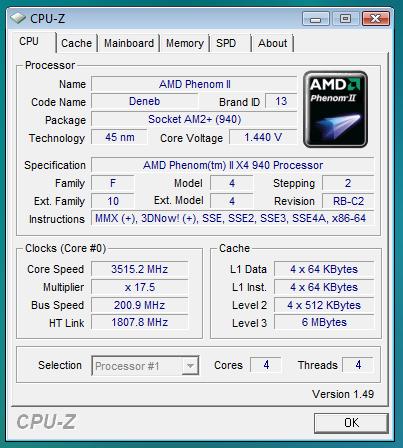
The maximum we reached with this processor was just a little above 3500MHz - 17.5x202. That frequency the processor reached wit relatively low voltage (1.4V compared to the default 1.3V) and with very low top temperature too (about 60 degrees centigrade under full load). Unfortunately, that was the absolute undeniable and final maximum that particular processor was capable of dashing out.
BIOS
Part of the essence in every overclocker motherboard is hidden in on very famous blue screen (NO, not the BSOD) associated with the word BIOS. DFI are known to thrust Phoenix AwardBIOS for quite a while now, and it easy to navigate through since it's being well known to the users all around.


Except the standard nowadays options, DFI have their own Genie BIOS section, that makes LanParty motherboards what they are. This section includes everything you need in order to overclock your system. Frequency settings, voltages, timings and many other specific (and not so much) functions of your components.


The motherboard has plenty of settings for processor voltages. The core voltage increase is done by smooth and small steps of 25mv (0.025V). Other voltages are controlled by steps of 0.05V, which are still small enough. The board has settings options for the main bus, the CPU multiplier and the HyperTransport multiplier too.


We can see option for detailed tuning the memory timings, as wel as the options for controlling the Advanced Clock Calibration (ACC) technology of AMD (though AMD never explained how it works). Our previous experience with it suggests that raising its value helps to stabilize an overclocked processor. If you had reached the processor maximum and are still able to boot in OS and even perform various light tasks without crashing the computer (being unstable) what you can do is run software such as Orthos, that will load all of the CPU cores. If one of them fails you can increase ACC for it alone from +2 to +4% ant that will probably help. Should the machine is not overclocked at all and you need it to be cool and power efficient - lower ACC for all cores to the minimal negative value at which the processor is stable. These are advices are based on our experience and the experiences of colleagues from other websites - it's difficult to define any side effects, benefits or demerits, that is up to you to determine for yourself. In the end - Genie BIOS can store up to 3 profiles with your overclock settings. You could make a quiet and "cold" profile, overclock at 24/7 and even extreme overclock one, dangerous for everyday use, but good for few benchmarks once in a while.
In short we can say that DFI LP DK 790FXB-M2RSH is the best motherboard for overclocking AM2 processors we ever laid hands on in the Modreactor lab. Thanks to its marvelous functions and BIOS it easily reaches frequencies beyond the reach of other boards, and when the overclock inevitably "fails" you still get to restore a stable condition with ease, without having to remove the battery or something like that.